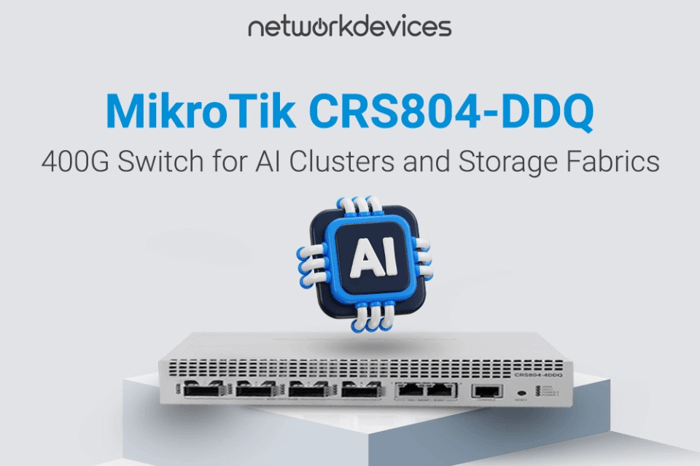

If you're building a 400G spine, storage fabric uplink, or GPU cluster interconnect and need predictable wire-speed switching without chassis-scale pricing, the MikroTik CRS804-DDQ (CRS804-4DDQ-hRM) is the practical choice. It's a 1U switch with 4× QSFP56-DD ports (40G/50G/100G/200G/400G) and 2× multi-gig Ethernet ports, designed to eliminate uplink bottlenecks in dense racks while keeping power consumption and noise under control.
The engineering takeaway is simple: this device is built to switch fast. It runs RouterOS v7 and supports Layer 3 features, but you should select it for switching (fabric/aggregation) first, then validate any routing or traffic-control features you plan to run at scale. This is not a PoE access switch, and it's not designed as a "one box does everything" router replacement for complex edge services.
In this article, we'll cover: ports and supported speeds including breakout planning, the hardware platform (Marvell 98DX7335 switch chip, ARM CPU, memory) and what it means in real deployments, power redundancy and thermal management, rack density and form factor, where the CRS804-DDQ fits best (datacenter aggregation, storage fabrics, AI/GPU clusters), and honest guidance on where it's the wrong tool.
Ports and Speeds: QSFP56-DD + Management Ethernet
You get 4× QSFP56-DD ports and 2× 1G/2.5G/5G/10G Ethernet ports for management, out-of-band access, or lower-speed uplinks. MikroTik lists QSFP-DD interface speed support for 40G/50G/100G/200G/400G—exactly what you need for a staged migration from 100G to 400G without a forklift upgrade.
Each QSFP-DD port is lane-based, enabling breakout options (MikroTik explicitly references scenarios such as splitting to two 200G links and also notes breakout modes down to lower per-lane speeds). In real deployments, treat breakout as an end-to-end compatibility task: your optics/DAC, NIC, and remote port must all support the same mode and FEC.
Inside the Box: Switch Chip + Control Plane Hardware
The forwarding is built around a Marvell 98DX7335 switch chip, which handles the heavy lifting for high-speed switching. The control plane is a quad-core AL52400 2 GHz ARM CPU (yes, "2.0 GHz"), with 4 GB DDR4 RAM and 512 MB NAND storage.
Practical implication: the ASIC is where you want your packets to live for consistent performance, and you should be deliberate about features that move work to the CPU. That's normal in this class of switch, and it's exactly how you keep throughput predictable at scale.
RouterOS v7: Switching-First, Routing With Intent
The CRS804-DDQ ships with RouterOS v7 (License level 6), so you get MikroTik's full management environment, automation hooks, and familiar tooling. That said, don't market it as a "core router" unless you've validated routing and policy behavior for your exact design; this platform's value is high-speed switching density, not running every possible service under load.
If you need L3 segmentation, start with clear requirements (routes, ACLs, telemetry, convergence expectations) and lab-test before you standardize.
Power and Cooling: Redundant Hot-Swap Design
This platform is designed for uptime with dual-redundant hot-swap power supplies and 2 AC inputs (100–240 V). Cooling is also serviceable (MikroTik calls out 2× hot-swap cooling fans, and you may see references to HotSwapFan accessories depending on sourcing and spares strategy).
MikroTik lists 92 W max power consumption without attachments and 123 W max at full load with optics installed. Those numbers are important when you're packing multiple high-speed devices into a rack with tight PDU and thermal budgets.
Form Factor and Rackmount Density
The CRS804-DDQ is a quiet, efficient 1U chassis intended for dense deployments. MikroTik includes the RMK-2x10/19 accessory so you can mount two CRS804 units in a single 1U slot of a standard 19-inch rack, which is a genuine advantage when you're building compact aggregation blocks.
Where It Fits Best: Data Center Aggregation, Storage Fabrics, and AI/GPU Clusters
High-Speed Aggregation and "Spine" Links
Use the CRS804-DDQ when your current design is hitting uplink limits, and you need a compact aggregation switch that can step from 100G to 200G/400G over time. The mixed-speed support helps you upgrade without ripping out the whole rack at once.
Storage Fabrics and Fast Uplinks
For storage fabrics, 400G uplinks (or split links like 2×200G) are a clean match for all-flash arrays, NVMe-oF uplinks, and environments where "move data fast" is the primary requirement. This is where 400G switching earns its keep: it eliminates avoidable fabric bottlenecks before you start tuning everything else.
AI Clusters (in Plain Engineering Terms)
MikroTik positions this unit as a building block for AI clusters and GPU-heavy racks where predictable, low-latency switching matters. Even if you prefer to call it "accelerator clusters," the design intent is the same: keep east-west traffic flowing at wire speed and avoid oversubscription surprises.
Compatibility Notes: SFP, Legacy Gear, and Real-World Interconnects
MikroTik explicitly frames the CRS804-DDQ as a future-proofing tool for existing networks, leveraging QSFP-DD lanes and breakout to interconnect older generations. If your environment still has SFP/QSFP endpoints, plan the interop with the correct optics, DACs, and breakout cables, and validate link training and FEC settings before rollout.
Quick Spec Checklist (CRS804-4DDQ-hRM)
- Model/product code: MikroTik CRS804-DDQ / CRS804-4DDQ-hRM
- Uplinks: 4× QSFP56-DD (supports 40G/50G/100G/200G/400G)
- Ethernet ports: 2× 1G/2.5G/5G/10G
- Switch chip: Marvell 98DX7335
- CPU: quad-core AL52400 ARM, 2.0 GHz
- Memory: 4 GB DDR4
- Storage: 512 MB NAND
- Power: dual hot-swap power supplies, 2× AC inputs (100–240 V)
- Power consumption: 92 W (without attachments) / 123 W max
- Operating temperature: -10°C to +60°C
- Rackmount: RMK-2x10/19 (mount two units in 1U)
If you're choosing optics, DAC, or breakout cables, validate them as a set with your NICs and upstream/downstream gear; 400G is unforgiving about mismatches. Also, confirm whether your design truly needs routing services here, or whether a switching-first fabric plus a dedicated router is the cleaner architecture.


FAQs
1. What is the price of the CRS804-DDQ?
Suggested price is $1,295. Street pricing varies by reseller and availability. Contact us for volume pricing and help selecting optics, DACs, and breakout cables.
2. Does the CRS804-DDQ support "gigabit" networks too?
Yes, but it's overkill for pure gigabit access switching. The right use is upstream aggregation or fabric, where gigabit/10G devices connect via the Ethernet ports or via appropriate uplinks and breakouts as part of a migration plan.
3. Does it provide PoE?
No. There's no PoE on this platform, and it shouldn't be positioned as an access-layer PoE switch.
4. What is the switching latency?
The Marvell 98DX7335 provides sub-microsecond latency in cut-through mode. Typical store-and-forward latency is 2-5 microseconds for standard frames.
5. Does it support RoCE for RDMA workloads?
Yes. The CRS804-DDQ supports RoCE traffic and provides low-latency, lossless switching with proper PFC and ECN configuration.
6. Can I stack multiple switches?
RouterOS doesn't support proprietary stacking, but you can build Layer 2/Layer 3 fabrics using LACP, MLAG scripting, or OSPF/BGP routing.