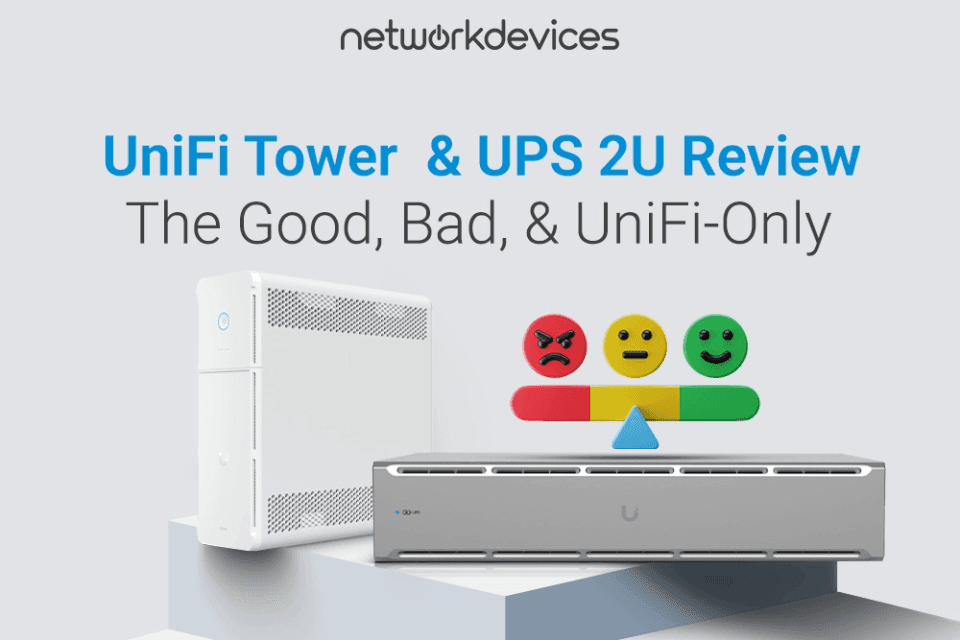

Ubiquiti has finally entered the uninterruptible power supply market with its UniFi UPS 2U and UPS Tower models. This is Ubiquiti's first entry into the UPS space, designed from the ground up to integrate perfectly with the UniFi ecosystem. These are primarily for users already invested in the UniFi ecosystem—especially those with a UNAS or UNVR—who need a cost-effective, managed solution.
The catch? They are aggressively priced, entry-level models with notable hardware and software compromises that potential buyers should consider before purchasing.
First Look: The UniFi UPS 2U vs. The UPS Tower
Ubiquiti’s initial launch targets the two most common form factors: rackmount and desktop. The UniFi UPS 2U and Tower are both line-interactive UPS systems with Ethernet management and simulated sine-wave output.
- UPS-2U: This 2U rackmount model is built for network racks. It offers a higher capacity of 1.44kVA/1000W and features eight total outlets (four battery-backed and four surge-only). It is powered by a field-replaceable 216Wh battery consisting of two 12V 9Ah lead-acid batteries.
- UPS Tower: This desktop/tower model is ideal for smaller deployments or SOHO setups. It provides 1kVA/600W of capacity and 10 total outlets (5 battery-backed, 5 surge-only). It uses a single hot-swappable 108Wh battery (one 12V 9Ah lead-acid battery).
The Core Value: UniFi Setup & Graceful Shutdown
The main selling point of these devices is their deep integration with the UniFi ecosystem. Setup is seamless: plug the UPS into your UniFi network, and it appears in the UniFi Network Controller for "simple adoption" and monitoring, just like a switch or access point.
For users with UniFi storage, the "Safe Shutdown Pairing" feature is the killer app. It allows the UPS to communicate directly with a UniFi UNAS or UNVR and command it to shut down gracefully during a power outage, protecting your data. In testing and user reports, UPS communicates shutdown commands with near-instant response times, ensuring minimal risk to stored data.
For non-UniFi gear, both models include a built-in NUT (Network UPS Tools) server. This is a fantastic inclusion, allowing third-party devices like a Synology NAS or a Proxmox server to monitor the UPS over the network and trigger their own safe shutdowns.
The "Gotchas": Real-World Limitations & User Feedback
These are first-generation, budget-friendly products, and a hands-on look reveals compromises. Synthesizing feedback from technical reviews and user forums, several key limitations are consistently reported.
The Critical Software Gap: No Auto-Restart
The most significant issue for many users is what happens after a graceful shutdown. Once utility power is restored, connected devices reportedly do not automatically power back on. This requires a user to manually log into the UniFi controller and power cycle the outlets to bring the network back online. This is a potential deal-breaker for remote or "lights-out" network racks where automatic recovery is essential.
Hardware & Design Compromises
Beyond the software, there are several hardware and design choices that users have noted:
- No LCD Screen: Neither model includes a front-panel LCD screen. This is a "hilarious" and strange omission for a modern UPS, as it prevents at-a-glance checks of load, battery runtime, or input/output voltage. All status information is only available inside the UniFi controller.
- Rear-Panel Power Button: On the UPS-2U rackmount model, the power button is located on the back of the unit. This has been criticized by users as a baffling design choice, making it "not super accessible" once the unit is installed in a rack.
- Simulated Sine-Wave: These are line-interactive, simulated sine-wave UPSs. This is fine for most switching power supplies in PCs and network gear, but it is not suitable for sensitive electronics, high-end servers, or audio equipment that require a pure sine-wave output.
- Lead-Acid Batteries: To hit their aggressive price point, both models use standard, field-replaceable lead-acid batteries. These are heavier and have a shorter lifespan than the lithium-ion batteries found in more premium (and expensive) models.
Ubiquiti's own launch blog does allude to a "Pro/Enterprise Series" that will feature pure sine-wave filtering and lithium-ion technology, confirming these initial models are the entry-level tier.
Despite these flaws, the devices still deliver reliable short-term backup for most prosumer setups.
The Verdict: Who is This Actually For?
Synthesizing the specs and real-world feedback, the choice becomes very clear.
Perfect For:
- UniFi users with a UNAS or UNVR who need a simple, cost-effective, and integrated graceful shutdown solution and are willing to accept the software's current limitations.
- Businesses or prosumers already managing their network via UniFi who value a single-pane-of-glass dashboard for monitoring and are on a budget.
Wait If:
- You need to power highly sensitive electronics, mission-critical servers, or audio gear that requires pure sine-wave filtering.
- You manage a remote or "lights-out" rack and require devices to auto-restart after a power failure.
- You are waiting for the announced "Pro/Enterprise" models with pure sine-wave and lithium-ion batteries.
Final Thoughts
The UniFi UPS 2U and UPS Tower are aggressively priced, first-generation products. Their deep integration with the UniFi ecosystem provides a unique, "vertically integrated" value that no competitor can match if you are already in that ecosystem.
They’re a fantastic, cost-effective addition for a home lab or small office—but users with mission-critical or remote deployments should carefully weigh the compromises.
Protect your UniFi stack today. Explore the UniFi UPS 2U and UPS Tower to find the right fit for your network's business continuity plan.


FAQs
1. Is the UniFi UPS pure sine-wave?
No. Both the UniFi UPS 2U and UPS Tower are line-interactive, simulated sine-wave models. This is perfectly suitable for most modern network gear and PC power supplies. Still, it is not recommended for highly sensitive electronics, high-end servers with active PFC, or pro-audio equipment. Ubiquiti has alluded to a future "Pro/Enterprise Series" that will feature pure sine-wave filtering.
2. Will my devices automatically turn back on after a power outage?
This is a critical limitation to understand. Based on extensive user reviews and testing, after the UPS performs a graceful shutdown, connected devices do not automatically power back on when utility power is restored. You must manually log into the UniFi Network controller and power cycle the outlets to bring your devices back online. This makes it a poor choice for remote, "lights-out" racks where automatic recovery is essential.
3. Can I use the UniFi UPS with non-Ubiquiti devices (like Synology)?
Yes. While the "Safe Shutdown Pairing" feature is for UniFi devices, both UPS models include a built-in NUT (Network UPS Tools) server. This is a fantastic feature that allows any NUT-compatible device on your network (like a Synology NAS, QNAP NAS, or a Proxmox server) to monitor the UPS status and trigger its own safe shutdown.
4. Is the battery in the UniFi UPS user-replaceable?
Yes. The batteries are "field-replaceable". The UPS 2U uses two standard 12V 9Ah lead-acid batteries, and the UPS Tower uses one 12V 9Ah lead-acid battery. This is a significant advantage for long-term maintenance, as you are not required to replace the entire unit.