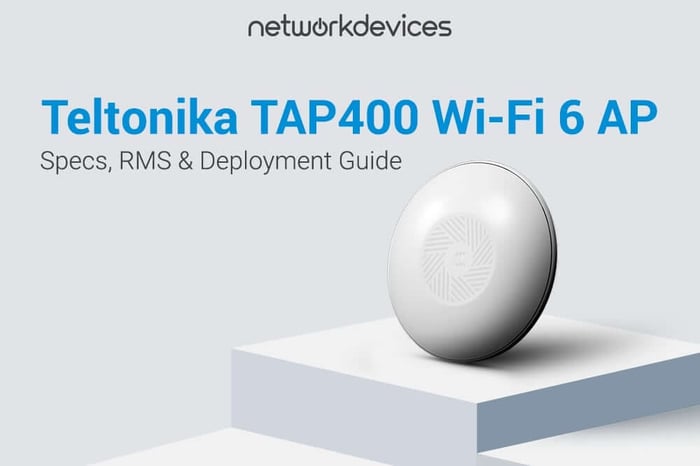

The Teltonika TAP400 is a Wi-Fi 6 (802.11ax) indoor access point built for SMB and enterprise edge environments where client density, multi-device airtime efficiency, and remote operations matter more than headline single-client PHY rates. It targets the failure mode I see repeatedly in small offices, retail, and hospitality: the WLAN "works" until you add more clients (phones, POS terminals, cameras, IoT sensors), then airtime contention, roaming drops, and on-site troubleshooting costs start to dominate.
What makes the TAP400 operationally different is not Wi-Fi 6 speed by itself. The differentiator is how the AP fits into the Teltonika Networks RMS open ecosystem: a single Teltonika device placed on a network provides visibility and remote access to third-party devices through one dashboard. Teltonika explicitly contrasts this with closed ecosystem platforms (Cisco, Ubiquiti, TP-Link, Aruba) that only manage their own hardware. For IT teams dealing with connectivity issues across multi-vendor environments, this changes the management calculus.
This article covers: Wi-Fi 6 vs Wi-Fi 5 for crowded networks, TAP400 hardware and radio specifications, the RutOS security and software stack, how Teltonika RMS manages multi-vendor networks, deployment patterns, and an engineer-focused FAQ.
What Is the Difference Between Wi-Fi 5 and Wi-Fi 6 for Crowded Networks?
Wi-Fi 5 (802.11ac) improved per-client throughput well, but it still wastes airtime when many stations compete. The AP allocates the full channel to one client at a time using OFDM, and as client count rises, per-device throughput degrades sharply.
Wi-Fi 6 (802.11ax) adds OFDMA, a scheduler that allocates subcarriers (resource units) so that multiple clients can transmit and receive within a single channel access. Teltonika frames this as a truck that used to run one destination per trip, while Wi-Fi 6 turns each trip into a multi-stop delivery: one channel access serves multiple clients, reducing waiting time under load.
In real deployments, OFDMA shows up as fewer random latency spikes from small-packet traffic, such as VoIP, POS terminals, barcode scanners, IoT sensors, and chatty mobile apps. The TAP400 also supports dual-band MU-MIMO, allowing the AP to transmit to multiple clients concurrently when channel conditions permit. This improves airtime utilization during busy periods, not peak speed for one laptop next to the AP.
The numbers from Teltonika's own testing: Wi-Fi 6 is approximately 40% faster than Wi-Fi 5 under lab conditions. In busy multi-device networks, that gap widens to up to 50% better performance (vendor-stated figure).
TAP400 Specifications: What's Inside This 802.11ax Indoor AP?
CPU, Memory, and Storage
The TAP400 uses a Mediatek dual-core 1.3 GHz CPU, 512 MB DDR3 RAM, and a dual-flash configuration: 16 MB SPI NOR Flash for firmware boot plus 512 MB SPI NAND Flash for the OS, configuration, and logs. These numbers matter for stability under management load, especially as clients, logs, telemetry, and active features scale up simultaneously.
2.5GbE PoE Uplink and Why It Matters
One RJ45 Ethernet port supporting 100/1000/2500 Mbps with auto MDI/MDIX crossover. I still see SMB builds where the WLAN looks "slow," but the actual bottleneck is a 1 Gbps Ethernet uplink feeding a busy AP. The TAP400's high-performance 2.5 GbE port prevents that ceiling in multi-client scenarios where aggregate Wi-Fi 6 throughput exceeds gigabit.
Power and PoE Budget
Power is delivered via 802.3af PoE Class 3 over the RJ45 port, accepting 44.0 to 57.0 V input with surge protection to 64.4 VDC. Consumption is under 7 W idle and under 11 W maximum, well within the Class 3 budget of 12.95 W. Plan on a PoE switch or injector in your bill of materials.
Wireless Performance and Client Scale
802.11b/g/n/ac/ax dual-band with MU-MIMO, delivering up to 2402 Mbps on 5 GHz and 576 Mbps on 2.4 GHz. Three internal omnidirectional antennas with peak gain under 4.33 dBi at 2.4 GHz and under 4.9 dBi at 5 GHz. Teltonika specifies up to 512 simultaneous connections. Treat that as a platform ceiling, not a design target. In practice, RF design, channel width, client mix, and application latency requirements determine how many users you actually support with acceptable performance.
Physical Build and Mounting
Ø158 mm × 31.4 mm, 285 g, UV-stabilized plastic and aluminum housing, IP30, operating 0 to 50°C. Integrated AP mounting bracket for ceiling install. This form factor is useful when you need a low-profile mount in finished spaces (small offices, clinics, boutique hotels) where larger AP housings become a stakeholder problem.
RutOS Feature Set: What Can a Network Engineer Actually Configure?
The TAP400 runs RutOS (OpenWrt-based Linux OS). From an operations perspective, that means familiar admin primitives: web UI (HTTP/HTTPS), SSH (v1/v2), CLI, JSON-RPC management API over HTTP/HTTPS, FOTA updates, and the Teltonika Web API (beta).
The webinar also references REST API support. If you run MSP workflows, the practical win is network automation without per-device click-ops. You can template config, stage changes, and script repetitive tasks using the JSON-RPC API and Web API. For telemetry and integration, Data to Server supports HTTP(S), MQTT, and custom Lua scripting. This functionality makes the TAP400 suitable for fleet-scale provisioning workflows.
Security and Enterprise Authentication
The full stack: WPA3-SAE, WPA3-EAP, WPA2-Enterprise (PEAP), WPA2-PSK, WPA-PSK, and OWE. EAP-TLS with PKCS#12 certificates for identity-based access control. 802.11w Protected Management Frames against deauthentication attacks. Built-in Certificate Manager generates CA, server, client, Let's Encrypt, and SCEP certificates on-device. SSH key-based auth, IP/login attempt blocking, and management plane access controls on the wired side.
VLAN Segmentation and Network Isolation
Tag-based VLAN separation with 802.1x port-based access control. In a typical SMB office, I split at least: corporate endpoints, voice, guest, and IoT (printers, TVs, cameras). The point is limiting broadcast domains and reducing lateral movement risk if an unmanaged IoT device gets compromised. DNS over HTTPS proxy is also available. It is not a replacement for proper resolver policy, but it is a tool some teams use to harden DNS transport on the edge.
Fast Roaming, Mesh, and Radio Assistance
802.11r fast roaming (fast BSS transition), 802.11s mesh, 802.11v BSS transition management, and 802.11k radio resource measurement. For hospitality and retail, 802.11r/k/v reduce "sticky client" behavior and shortens reassociation time when users move between coverage zones, maintaining connectivity throughout the physical space. Hotspot 2.0 enables automatic secure connection at participating venues, and a built-in QR code generator handles guest onboarding without manual credential entry.
How Does Teltonika RMS Manage Third-Party Devices?
Most enterprise Wi-Fi platforms are closed ecosystems by design: they manage their own APs, switches, and gateways, and that's where visibility stops. If your network has a Cisco router, Fortinet switch, and Aruba AP, you maintain three separate management portals and three credential sets.
Teltonika's approach is explicitly open. Place one Teltonika device on the network, including a TAP400, and the Remote Management System (RMS) visualizes and provides access to every connected device, including third-party gear. IT admins can remotely reach Cisco routers, Palo Alto firewalls, Dell switches, Hikvision cameras, and MikroTik gateways from one dashboard.
The Network Map tool is more than a topology diagram. It surfaces interface-level configuration, supports real-time VLAN changes pushed from the map view, and answers the two questions you need answered fast when troubleshooting a remote site: "What's connected where?" and "Which segment is this endpoint actually on?"
RMS Connect: Remote Access to Any Device Behind the TAP400
RMS Connect is the mechanism for secure remote access into third-party device management planes (WebUI or CLI) through any Teltonika device on the network. This covers switches, cameras, firewalls, devices reachable only via command-line shell, and Linux/Windows machines, giving IT departments remote access without maintaining separate VPN tunnels per device type.
For MSPs, the benefit is fewer truck rolls for tasks that boil down to "log into the thing and change one setting." It also reduces the vendor portal sprawl when a site runs hardware from three or four different manufacturers.
The TAP400 includes two years of free RMS. For MSPs managing dozens of client sites, deploying a TAP400 at each location provides wireless coverage plus a remote management gateway to every device at that site, without additional licensing cost for two years.
Deployment Use Cases: Where the TAP400 Fits
Enterprise Wi-Fi 6 Access Point for SMB Offices
In a 30 to 80-seat office with meeting rooms, VoIP, printers, and IoT screens, I design for airtime efficiency first. The TAP400's OFDMA scheduling, VLAN tag separation, and WPA3-EAP / WPA2-Enterprise fit this pattern. The 2.5 GbE uplink matters if you aggregate multiple APs into a 2.5G/10G access layer and want to avoid a 1G choke point per AP during peak hours.
Wi-Fi 6 Access Point for Hotels and Retail Fast Roaming
Roaming-heavy environments where phones, scanners, and staff tablets are all moving. The TAP400's 802.11r fast roaming maintains session continuity, which Teltonika calls essential for small hotels. The wireless QR code generator handles guest onboarding, but you still need guest isolation and an acceptable use policy properly implemented.
IoT Network Management for Smart Buildings and Distributed Sites
Schools, clinics, and mixed-use buildings accumulate IoT endpoints fast. The TAP400's 802.11s mesh capability reduces the scope of construction in buildings where new cable runs require approval. A scenario I've dealt with: a small clinic with two floors and an older ceiling space where cable runs needed building permits. Mesh fixed the cabling problem, but we still validated RF paths and capacity. Mesh fixes "no cable," not "bad spectrum." RMS Connect handles multi-vendor visibility across sites from a single console.
Where the TAP400 Fits in the Market?
The TAP400 is one of the smallest Wi-Fi 6 access points in the market, with a compact Ø158 mm footprint designed for indoor ceiling-mount deployment. PoE-only power eliminates adapter clutter, and the integrated mounting bracket simplifies installation to a single Ethernet run.
The real evaluation question for IT teams is not whether the AP supports Wi-Fi 6. Most current APs do. The question is whether the RMS open ecosystem approach reduces your operational cost in a network that is already a mix of vendors, and whether that cost reduction justifies standardizing on Teltonika's platform.
Conclusion
The Teltonika TAP400 is a practical 802.11ax indoor AP: 2.5 GbE uplink, 802.3af PoE, WPA3-Enterprise security, full 802.11r/k/v support, and up to 512 simultaneous clients.
Its operational value centers on the Teltonika RMS open ecosystem. Network Map handles topology and configuration visibility. RMS Connect provides remote access to third-party devices from one dashboard. If your environment is multi-vendor and distributed, that single-pane-of-glass management approach is worth more than a small delta in raw PHY rates.


FAQs
1. What is the maximum number of devices the Teltonika TAP400 supports simultaneously?
Teltonika specifies up to 512 simultaneous connections. In deployment planning, treat that as a platform limit. Real capacity depends on airtime budget, channel plan, client mix, and application latency requirements.
2. Does the TAP400 require a Teltonika gateway to use RMS?
No. The TAP400 itself connects to RMS independently. Even if the network gateway is from another manufacturer (Cisco, MikroTik, or otherwise), the TAP400 enables RMS tools such as Network Map and RMS Connect for third-party device access.
3. What is the difference between Wi-Fi 6 and Wi-Fi 5 in a multi-device office environment?
Wi-Fi 6 allows the access point to communicate with multiple clients simultaneously via OFDMA rather than sequentially. Teltonika's testing shows approximately 40% improvement in lab conditions and up to 50% better performance in busy multi-device networks compared to Wi-Fi 5 (vendor-stated figures). The practical gain is scheduling efficiency under contention, not just higher peak rates.
4. How does Teltonika RMS Connect work with third-party network devices?
RMS Connect enables secure remote access to the WebUI or CLI of third-party equipment connected to the local network through any Teltonika device, including the TAP400. This covers routers, switches, firewalls, cameras, and servers, reducing the need for multiple vendor portals in multi-vendor environments. The TAP400 includes two years of free RMS access.
5. Is it possible to update access point firmware by using RMS?
Yes. The TAP400 supports FOTA (Firmware Over The Air) updates, and RMS enables firmware and configuration deployment to multiple devices at once. This allows IT teams to stage and push firmware updates across an entire fleet of access points from a single management interface without on-site visits.