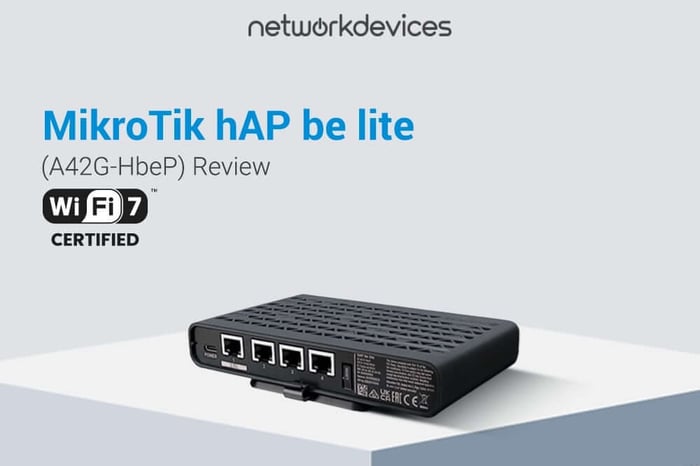

The MikroTik hAP be lite is a compact dual-band Wi-Fi 7 router and access point running RouterOS v7 at license level 4. If you are refreshing a small office, a branch site, or a fleet of low-density access points and you want RouterOS features instead of consumer firmware, this is the right device for the job. If you are chasing Wi-Fi 7 peak throughput figures, it is not.
The constraint is the band plan. BE3600 is a dual-band class covering 2.4 GHz and 5 GHz, and the hAP be lite has no 6 GHz radio. What you gain over a well-configured Wi-Fi 6 deployment is consistency under congestion, not headline speed. That tradeoff is the whole story of this device, and any review that skips it is reprinting vendor copy.
The MikroTik hAP be lite, product code A42G-HbeP, is built on a dual-core Airoha AN7563PT ARM 32bit CPU running at 950 MHz, paired with 512 MB of RAM and 128 MB of NAND storage. Wireless is handled by a MediaTek MT7991 across both bands: dual-chain 2.4 GHz at 4.4 dBi with a maximum data rate of 688 Mbit/s, and triple-chain 5 GHz at 7 dBi with a maximum of 2882 Mbit/s. Wired connectivity is three Gigabit Ethernet ports plus one 2.5 Gigabit Ethernet port. The unit is powered over USB-C at 5 V, draws up to 12 W, and is passively cooled with an IP20 rating.
This article covers how the hAP be lite differs from the original hAP lite (RB941-2nD-TC), what Wi-Fi 7 actually delivers on a dual-band radio, how Multi-Link Operation behaves here, the hardware in detail, where the BE3600 figure comes from, how to place the 2.5G Ethernet port, powering and placement constraints, first boot and Netinstall, what RouterOS license level 4 unlocks, CAPsMAN and CAP mode deployment, and the scenarios where you should buy something else.
What the MikroTik hAP be lite is
The hAP be lite is a compact indoor Wi-Fi 7 router and access point from MikroTik, sold as A42G-HbeP internationally and A42G-HbeP-US in the United States. It combines dual-band 802.11be wireless with four wired Ethernet ports in a passively cooled desktop enclosure, and it ships with RouterOS v7 preinstalled and licensed. It sits at the entry tier of MikroTik's Wi-Fi 7 lineup.
hAP be lite vs the original hAP lite (RB941-2nD-TC)
These are two different products separated by roughly a decade, and search results constantly conflate them. The RB941-2nD-TC hAP lite is a Wi-Fi 4 device with a single 2.4 GHz radio and four fast ethernet ports. The hAP be lite (A42G-HbeP) is a Wi-Fi 7 device with dual-band radios, three Gigabit Ethernet ports, and one 2.5G Ethernet port.
If a listing, review, or comparison you are reading mentions Wi-Fi 4 or Fast Ethernet ports, it is describing the RB941-2nD-TC and not this device. Confirm the product code before ordering.
What Wi-Fi 7 gives you on a dual-band radio
On this hardware, Wi-Fi 7 delivers efficiency gains rather than access to new spectrum. The 802.11be features that carry over to 2.4 GHz and 5 GHz are multi-link operation, denser modulation, and better scheduling when many clients contend for the same airtime.
Expect steadier latency in dense environments and fewer retransmissions. Do not expect a doubling of throughput over a properly tuned Wi-Fi 6 access point in the same room.
How Multi-Link Operation works on the hAP be lite
Wi-Fi 7 multi-link operation lets a capable client hold simultaneous links on 2.4 GHz and 5 GHz rather than associating with one band at a time. In practice, MLO reduces the sticky-client problem where a laptop clings to a weak 5 GHz association while the 2.4 GHz radio sits idle.
The benefit only materializes with MLO-capable clients. In most fleets today that means recent flagship phones and laptops, not the installed base, so treat MLO as a benefit that grows over the life of the deployment.
Hardware breakdown: CPU, radios, and antenna gain
The dual-core ARM CPU is an Airoha AN7563PT running at 950 MHz with two threads, backed by 512 mb of RAM and 128 MB of NAND. The same AN7563PT part also handles switching, and the architecture is ARM 32bit.
Wireless is a single MediaTek MT7991 driving dual-chain 2.4 GHz at 4.4 dBi and triple-chain 5 GHz at 7 dBi. Seven dBi is respectable for a desktop enclosure, but antenna gain does not substitute for correct placement, and 4.4 dBi on 2.4 GHz is modest by design.
Where the BE3600 figure comes from
BE3600 is the sum of both bands, not a single-link rate. The datasheet lists a maximum of 688 Mbit/s on 2.4 GHz and 2882 Mbit/s on 5 GHz, which totals 3570 Mbit/s and rounds to the BE3600-class label.
No single client will ever see 3.6 Gbps from this access point. Treating BE3600 as a per-client figure is the most common misreading of Wi-Fi 7 marketing.
Where to put the 2.5 Gigabit Ethernet port
Use the 2.5 gigabit Ethernet port as the uplink in almost every deployment. With a 5 GHz radio rated at 2882 Mbit/s, a Gigabit uplink becomes the bottleneck before the radio does.
The exception is a site with a sub-gigabit WAN and a local file server, where the 2.5 G Ethernet port earns more attached to the NAS than to the internet edge. The three Gigabit ports handle everything else.
USB-C powering, draw, and placement
The hAP be lite is powered over USB-C at 5 V and draws up to 12 W, and the bundled 5 V 2.4 A adapter supplies exactly 12 W with no headroom. Substituting a charger that negotiates 5 V at lower current will produce instability under sustained wireless load, so match or exceed 2.4 A if you source your own supply.
There is no PoE input and no PoE output on this device. Ceiling or above-tile mounting requires a separate injector and a PoE-to-USB-C splitter, which is usually a sign you should be buying a different access point.
What RouterOS license level 4 unlocks
The device ships with RouterOS v7 and license level 4, preinstalled and activated, with no subscription and no paywalled feature tier. Level 4 permits wireless AP mode along with the full routing, firewall, VLANs, VPNs, queueing, and scripting feature set that makes RouterOS worth deploying in the first place.
Level 4 does impose ceilings on active tunnel count and hotspot user count. Check MikroTik's published license table before using an hAP be lite as a VPN concentrator or a hotspot gateway for anything beyond a small site.
CAPsMAN, CAP mode, and fleet deployment
The hAP be lite can act as a controller or run in CAP mode as a managed access point under Capsman. This is where the device makes the most sense at scale, because centralized provisioning removes the per-unit configuration cost that usually kills budget access point rollouts.
One caveat that catches people: Wi-Fi 7 hardware requires the RouterOS 7 wifi package implementation of CAPsMAN, not the legacy wireless package version. A controller still running legacy CAPsMAN will not provision be-generation devices, so plan the controller upgrade before the hardware arrives.
Where the hAP be lite fits
This is a strong fit for a small office, a retail counter, a workshop, a branch site, a hotel room, or a lab bench. Any indoor location under roughly 25 concurrent clients where you want a Wi-Fi 7 access point with real RouterOS capability and no PoE infrastructure is the target case.
It is also a credible answer for the engineer who found the flagship models excessive and the Wi-Fi 6 options unconvincing, which is exactly the position most people evaluating this device are in.
Where it does not fit, and what to buy instead
Skip it for outdoor or unconditioned spaces. The enclosure is IP20 with passive cooling and a tested ambient ceiling of 50 C, and neither figure tolerates a plant room or an exterior wall.
Skip it for high-density environments. With no 6 GHz band and three chains on 5 GHz, capacity runs out well before a tri-band Wi-Fi 7 access point would. And if your site standard is PoE-powered ceiling mounting, buy a cAP-class access point instead and accept the older wireless generation, because retrofitting power to this device costs more in parts and annoyance than the difference is worth.
Specifications
| Field | Value |
|---|---|
| Product code | A42G-HbeP (US: A42G-HbeP-US) |
| Architecture | ARM 32bit |
| CPU | Airoha AN7563PT, 2 cores, 2 threads, 950 MHz |
| Switch chip | AN7563PT |
| RAM | 512 MB |
| Storage | 128 MB NAND |
| Operating system | RouterOS v7, license level 4 |
| Wireless chip | MediaTek MT7991 (both bands) |
| 2.4 GHz | Wi-Fi 7, 2 chains, 802.11b/g/n/ax/be, 4.4 dBi, 688 Mbit/s max |
| 5 GHz | Wi-Fi 7, 3 chains, 802.11a/n/ac/ax/be, 7 dBi, 2882 Mbit/s max |
| Wireless class | BE3600 |
| Ethernet | 3x 10/100/1000, 1x 2.5G |
| Power input | USB-C, 5 V, bundled 5 V 2.4 A adapter |
| Max power consumption | 12 W |
| Cooling | Passive |
| IP rating | IP20 |
| MTBF | Approximately 100,000 hours at 25 C |
| Tested ambient temperature | -40 C to 50 C |
| Certification | CE, FCC, IC, EAC, RoHS |
The verdict
Buy the hAP be lite if you are deploying indoor access points at volume, you want RouterOS and CAPsMAN rather than a vendor cloud, and your density is moderate. Skip it if you need 6 GHz, PoE, more than one 2.5G port, or an enclosure rated for anything harsher than an office.


FAQs
1. Is the MikroTik hAP be lite dual-band or tri-band?
The hAP be lite is dual-band. It has a 2.4 GHz radio and a 5 GHz radio, both Wi-Fi 7, and no 6 GHz radio. The BE3600 class label refers to the combined maximum data rate of both bands, 688 Mbit/s plus 2882 Mbit/s, and not to a third band. If your deployment specifically needs 6 GHz for capacity or for clean spectrum, this is the wrong device and you need a tri-band Wi-Fi 7 access point instead.
2. Is the hAP be lite the same as the older hAP lite?
No. The original hAP lite is the RB941-2nD-TC, a Wi-Fi 4 device with a single 2.4 GHz radio and four Fast Ethernet ports. The hAP be lite is product code A42G-HbeP, a Wi-Fi 7 device with dual-band radios, three Gigabit Ethernet ports, and one 2.5 Gigabit Ethernet port. The names are similar, and listings frequently mix them up, so check the product code rather than the model name when ordering.
3. Does the MikroTik hAP be lite support PoE?
No. The hAP be lite has no PoE input and no PoE output. It is powered over USB-C at 5 V and ships with a 5 V 2.4 A adapter, drawing up to 12 W at maximum load. To mount it somewhere without a power outlet you would need a PoE injector plus a PoE-to-USB-C splitter, which adds cost and failure points. For PoE-powered ceiling deployments, a cAP-class MikroTik access point is the appropriate choice.
4. What RouterOS license level does the hAP be lite include?
The hAP be lite ships with RouterOS v7 at license level 4, preinstalled and activated. No separate purchase is required and there is no subscription. Level 4 permits wireless AP mode plus the full firewall, VLAN, VPN, queueing, and scripting feature set. It does cap the number of active tunnels and hotspot users, so verify those limits against MikroTik's license table if you plan to use the device as a VPN concentrator or hotspot gateway.
5. Can the hAP be lite run as a CAP under CAPsMAN?
Yes. The hAP be lite can operate in CAP mode as a managed access point, or act as the CAPsMAN controller itself. One requirement catches people upgrading existing fleets: Wi-Fi 7 hardware needs the RouterOS 7 wifi package implementation of CAPsMAN rather than the legacy wireless package version. A controller still running legacy CAPsMAN will not provision this device, so upgrade the controller before adding be-generation access points.