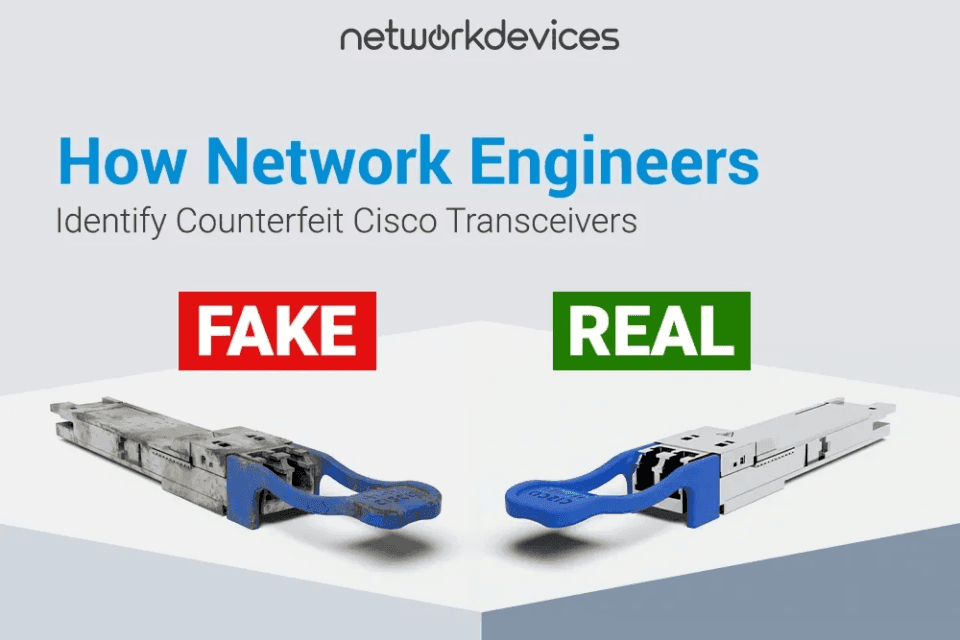

Counterfeit Cisco transceivers are one of the most under-detected risks in enterprise network infrastructure. They do not throw obvious errors on insertion. On many platforms, they populate show inventory output with plausible data. They can sit in production data center environments for weeks or months until a firmware upgrade, a temperature shift, or a traffic surge exposes them through intermittent link flaps, silent packet loss, and rising error behavior that consumes hours of troubleshooting.
I have pulled counterfeit SFP+ modules out of production aggregation switches that passed initial acceptance without a single warning. The packaging looked right, the security labels matched typical Cisco formatting, and the switches accepted them cleanly. Under sustained load, they told a different story.
The core detection principle is straightforward. Every SFP stores its identity in an EEPROM chip, readable over the I²C bus via standard CLI commands. Counterfeit manufacturers clone EEPROM templates from genuine modules, but they almost always get something wrong. A blank vendor name, a zeroed-out OUI, absent DOM support, or threshold values that do not match the claimed model behavior. Physical inspection catches the obvious fakes. CLI-based EEPROM validation catches the rest.
This case study and guide are intended for network engineers, IT managers, and procurement teams who need a reliable process for authenticating Cisco SFP, SFP+, and QSFP transceiver modules. Whether you are auditing inventory, validating a new reseller, or troubleshooting unexplained downtime, these are the methods I use in the field.
Key Takeaways
1. EEPROM validation is the single most reliable method to detect counterfeit Cisco equipment. Physical inspection catches obvious fakes, while CLI checks catch the rest.
2. Counterfeit SFPs clone EEPROM templates, but they usually leave inconsistencies like an all-zero OUI, blank part numbers, or missing integrity fields when the platform reports them. Not all platforms expose checksum or integrity status in CLI output, so treat this as a supporting signal.
3. Many Cisco optics use an 11-character serial pattern (LLL YYWW xxxx). Deviations do not prove counterfeiting by themselves, but they justify deeper EEPROM validation.
4. DOM and DDM readings that are absent, frozen, or outside datasheet expectations are suspicious and warrant investigation.
5. The show idprom command, where supported, is one of the most effective tools because it exposes raw EEPROM identity fields that counterfeit products rarely get perfectly right.
6. Legitimate third-party optics are clearly branded with their own vendor identity. Counterfeits impersonate Cisco hardware.
7. Sourcing from authorized partners and verified suppliers with strict anti-counterfeit practices protects uptime, cybersecurity posture, and procurement integrity.
What is Counterfeit vs. Grey Market vs. Refurbished
Before diving into technical checks, separate these supply chain categories. They carry very different risks.
Counterfeit products: Illegal fakes. They carry forged Cisco branding, fake security labels, and cloned serial conventions. They are often built with substandard PCB design and inconsistent components. They can create real stability and cybersecurity risk.
Refurbished hardware: Genuine equipment that has been previously used, wiped, tested, and resold. Authentic refurbished gear can be a valid cost strategy, but warranty coverage varies. Cisco Refresh is the official path for Cisco refurbished products. We do not sell refurbished hardware.
Grey market: Genuine Cisco products sold outside authorized channels. The hardware may be real, but support, firmware entitlements, and warranty coverage can be limited or complicated. Grey-market risk is mainly commercial and operational, rather than technical.
Third-party compatible optics are separate from all three. They are a valid engineering choice when clearly branded under the third-party vendor name. The risk is not third-party hardware. The risk is of counterfeit products pretending to be Cisco products.
Core Concepts
What Is an SFP Transceiver
Quick Definition: An SFP (Small Form-factor Pluggable) transceiver is a compact module that connects Cisco devices such as switches, Cisco routers, and firewalls to fiber-optic or copper Ethernet cabling. It evolved from the older GBIC form factor to enable higher port density.
Inside an SFP module, you will find a laser transmitter, a photodiode receiver, driver ICs, and a PCB. For counterfeit detection, one component matters most: the EEPROM.
What is EEPROM and I²C
Quick Definition: The EEPROM is a memory chip that stores identity fields such as vendor name, part number, serial number, wavelength, data rate, and compliance codes. The host reads it over the I²C serial interface.
This is exactly why CLI commands can reveal what the optic claims to be.
What is DOM and DDM
Quick Definition: DOM and DDM are digital diagnostics that report sensor data, such as internal temperature, voltage, laser bias current, Tx power, and Rx power.
Diagnostic behavior is one of the best practical ways to spot counterfeit optics that otherwise look fine. Some platforms also expose a diagnostics capability flag in the transceiver details or in the EEPROM output, depending on the OS and hardware.
What is SFF-8472
Quick Definition: SFF-8472 is an industry MSA that defines transceiver memory mapping and digital diagnostic monitoring for many SFP and SFP+ modules. It standardizes identity fields and diagnostic reporting via I²C.
Why EEPROM Validation Is the Most Reliable Detection Method
The EEPROM is the digital fingerprint of the module. When a switch reads an optical transceiver, it does not analyze the laser chemistry. It reads the EEPROM. If the EEPROM claims it is a Cisco SFP-10G-SR with a particular serial number, the host will often treat it accordingly.
Counterfeit modules clone EEPROM templates from genuine Cisco transceivers. Here is what commonly goes wrong in fakes:
- Misidentified optic: claims to be one PID ,but the internal optics do not match
- Breakage after software updates: Cisco IOS and IOS-XE behavior can change and expose malformed identity fields
- Integrity anomalies: checksum or integrity fields may be inconsistent when the platform reports them
- Vendor identity mismatch: blank fields, all-zero OUI, or contradictory vendor strings
- Diagnostic anomalies: missing DOM support, frozen readings, or thresholds that look like a generic template
- Physical inspection catches obvious fakes. EEPROM validation catches the fakes that pass visual checks.
Layer 1: External Visual Inspection
Physical inspection is your first line of defense. Visual checks alone do not prove authenticity, but they reliably identify obvious fake Cisco modules before they reach a production port.
Hologram and Security Labels
Cisco Brand Protection uses holographic security indicators on many optics. When present, look for the following clues:
- Clear holographic color shifts when tilted
- Sharp pattern edges with no blur
- Printing that looks crisp, not grainy
- A sticker that is firmly bonded to the housing
Counterfeits often use cheap adhesive that peels easily or a flat metallic label with weak color shift.
Labels and Typography
Counterfeiters often struggle to match label typography and print quality. Inspect carefully:
- Font weight and spacing
- Alignment of text lines
- Clarity of small print
- Consistent label material and finish
Blurry ink, inconsistent spacing, or misalignment is suspicious.
Physical Controls, Connector Quality, and PCB Clues
Inspect the connector and mechanical fit:
- Check the latch and pull-tab feel
- Inspect the gold pin alignment
- Look for rough seams or inconsistent housing finish
If the internal PCB is visible through the housing, poor soldering, flux residue, or sloppy assembly are red flags. Do not rely on this alone, but include it in your evaluation.
Serial Number and Part Number Consistency
Many Cisco optics use an 11-character serial pattern: facility prefix, date code, and unique identifier. Treat serial patterns as a clue, not proof.
- Confirm label serial matches packaging serial if available
- Confirm CLI serial matches the label
- If the serial format looks wrong, validate via Cisco tools on cisco.com and internal procurement records
Layer 2: CLI Validation Checks
Physical inspection catches obvious counterfeits. CLI validation catches everything else.
Quick Triage Commands
If you only run three commands, start here:
Switch# show logging | include TRANSCEIVER|SFP|GBIC|EEPROM|I2C|IDPROM
Switch# show inventory
Switch# show idprom interface <interface>   (where supported; syntax varies by platform)
If any output shows blank vendor fields, an all-zero OUI, or repeated transceiver warnings, quarantine the optic and validate it against a known-good module of the same type.
show logging: Transceiver Warnings
Start with the system log. A fake SFP might pass basic checks but generate warnings, especially after upgrading software.
Switch# show logging| include TRANSCEIVER|XCVR|SFP|GBIC|EEPROM|I2C
%TRANSCEIVER-3-NOT_CISCO: SFP in Te1/1/3 is not a genuine Cisco product
You may see messages like this on certain platforms and versions. The exact syslog format varies. When it appears, investigate immediately.
show inventory: PID, VID, Serial Verification
The show inventory command displays installed hardware components and may include optics identity fields such as PID, VID, and serial number.
Switch# show inventory
NAME: "TenGigabitEthernet1/1/1", DESCR: "SFP-10GBase-SR"
PID: SFP-10G-SR        , VID: V03  , SN: FOC2218KXYZ
NAME: "GigabitEthernet1/1/3", DESCR: "1000BaseLX SFP"PID:                    , VID:      , SN: FNS0827A12H
If PID and VID are empty while serial is present, treat it as suspicious. Do not stop there. Also, verify that the serial number in the CLI matches the serial number printed on the physical label. A mismatch suggests relabeling, mixing, or counterfeit supply.
show interface transceiver detail: DOM Analysis
This command reads live DOM sensor data alongside thresholds when supported.
What to look for:
- Values that fluctuate over time
- Tx and Rx power that behaves like a real link budget
- Thresholds that make sense for the module class
Red flags:
- DOM notis supported on a module that claims diagnostic capability
- Frozen values that never change
- Impossible readings for your environment
- Thresholds that look generic across unrelated modules
If a module claims DOM capability in identity data but reports no diagnostics, treat it as suspicious. Not all platforms expose capability flags the same way, so use this as part of a combined verdict.
show idprom: Raw EEPROM Identity
This is one of the most effective checks that the platform supports. It exposes raw EEPROM identity fields.
Switch# show idprom interface TenGigabitEthernet1/1/3
  Vendor Name       :
  Vendor OUI        : 00.00.00
  Vendor Part No    :
  Vendor Revision   :
  Vendor Serial No  : FNS0827A12H
A blank Vendor Name, a blank part number, and an all-zero OUI are a classic counterfeit footprint. Counterfeiters often clone the serial convention but fail to consistently populate deeper identity fields.
Genuine vs. Counterfeit Cisco Transceivers: Quick Comparison
| Check | Genuine Cisco or Legit Compatible | Counterfeit Indicators |
| Security labels | crisp hologram and clean sticker print are present | flat look, fuzzy edges, easy peel |
| Part number alignment | label, order, and CLI align | mismatched or missing identity fields |
| Serial consistency | label, packaging, and CLI align where available | mismatches or implausible formatting |
| show logging | clean insert events, no repeated EEPROM warnings | non-genuine warnings, EEPROM, and I²C errors |
| show inventory | PID and VID are often present where supported | missing PID and VID, generic identity |
| DOM behavior | values fluctuate, thresholds look sensible | unsupported when capability is claimed, frozen,or impossible values |
| show idprom | coherent vendor fields and identity | blank vendor fields, all-zero OUI, missing part number |
Troubleshooting After Firmware Upgrades (Cisco IOS, IOS-XE)
Firmware upgrades are a common trigger. An optic that worked fine can fail after an IOS or IOS-XE change because:
- Validation or support behavior becomes stricter
- EEPROM parsing changes and exposes malformed fields
- DOM polling behavior changes and stresses marginal modules
Practical approach:
- Capture before and after outputs for show logging, show inventory, and show idprom
- Compare against a known-good optic of the same type
- Isolate and quarantine that lot if only one batch fails after the upgrade
Do this before you chase VLAN, routing, or spanning-tree explanations. Optics can mimic higher-level issues when unstable.
Summary: Protect Your Network at the Source
Counterfeit transceivers misrepresent identity, capability, and compliance. When they fail, they mimic legitimate network infrastructure problems and burn engineering hours before anyone suspects optics.
The good news is that fakes are detectable through careful visual inspection and rigorous CLI validation. The most effective defense is prevention. Sourcing network infrastructure from authorized and verified suppliers reduces counterfeit risk at the source and supports warranty and support paths.


FAQs
1. How do I check if a Cisco switch is original?
Inspect physical security labels and use show version and show inventory to capture PID and serial numbers. Validate against procurement records and Cisco coverage tools on cisco.com for warranty status.
2. How to verify if your Cisco SFP is genuine or fake?
nspect label quality, connector fit, and any holographic indicator. Then insert the module and run show idprom interface <interface> and show interface transceiver detail where supported. Genuine optics typically present coherent vendor identity fields and realistic DOM behavior. Counterfeit products often show blank identity fields, all-zero OUI, or suspicious diagnostics.
3. Does this work for Cisco routers too?
Yes. The EEPROM and I²C identity process is the same whether the optic is installed in a Cisco Catalyst switch, a Cisco router, or a firewall. Command availability varies by platform and software train, but the validation logic remains consistent.
4. What CLI command verifies a Cisco switch?
The show inventory command is a strong starting point because it lists installed components and serial numbers. Use show version to confirm firmware, platform identity, and base system details.
5. Why did my Cisco IoT VLAN stop working after upgrading to IOS-XE 17.9.6?
After upgrades, platforms may enforce stricter validation or support behavior. If you are using counterfeit, grey market, or unsupported optics, the upgrade can surface problems through port errors or transceiver rejection. Check logs and validate optics before assuming a VLAN issue.
6. What are the signs of a counterfeit Cisco transceiver?
Common signs include blurry typography on the sticker, a flat hologram that does not color-shift, poor mechanical fit, missing vendor identity fields in CLI, missing or frozen DOM telemetry, and recurring transceiver warnings in logs.