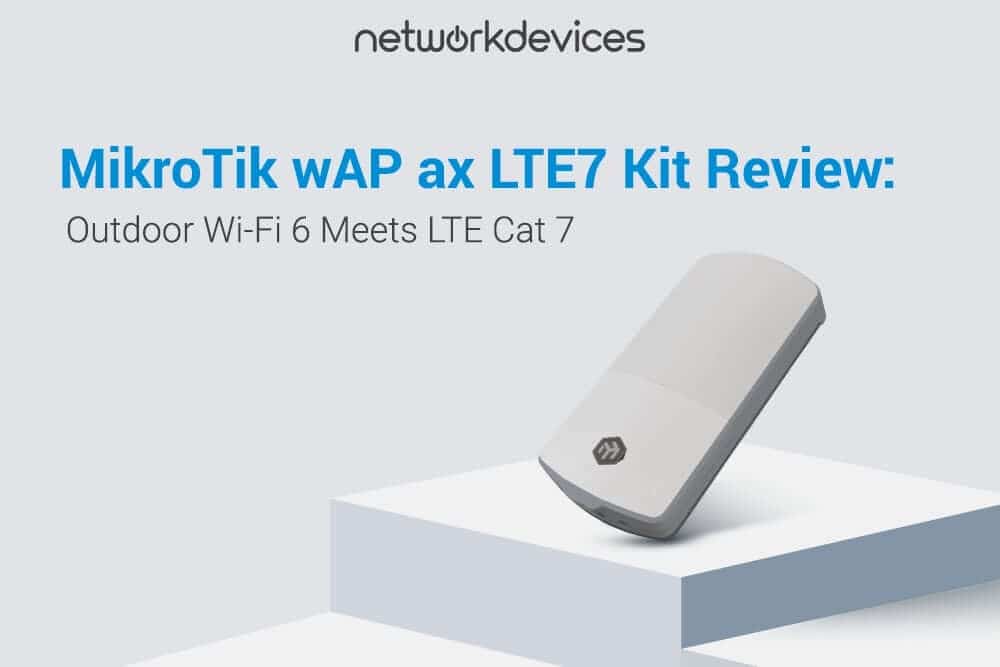

If you currently run a wAP ac LTE6, this upgrade demands your attention. The MikroTik wAP ax LTE7 kit (product code: wAPGR-5HaxD2HaxD&R11e-LTE7) is an IP66-rated outdoor access point that combines dual-band Wi-Fi 6 (802.11ax) with an integrated Cat7 LTE modem. It delivers up to 300 Mbps download and 100 Mbps upload over cellular, with antenna gain nearly tripled from 2.5 dBi to 6.9/7 dBi, better durability, and expanded LTE band support. It replaces the wAP ac LTE6 kit in MikroTik's outdoor LTE product lineup. You can find the full datasheet on MikroTik's official product page.
In this article, we will cover hardware specifications and datasheet highlights, Wi-Fi 6 capabilities for outdoor deployments, LTE Category 7 performance, RouterOS v7 software features, IP66 enclosure build quality, target use cases, deployment and mounting, a head-to-head comparison with the wAP ac LTE6, what ships in the box, honest trade-offs, and who should buy this device. We will also answer common questions like how to set up LTE on MikroTik and what range to expect from the wAP ax.
Hardware Specifications and Datasheet Highlights
MikroTik overhauled the internal board. The unit runs on a dual-core Qualcomm IPQ-5010 processor clocked at 800 MHz on a 64-bit ARM architecture. System memory sits at 256 MB DDR3L. Storage is 128 MB NAND, eight times the 16 MB flash on the predecessor. The operating system is RouterOS v7 with License Level 4. Physical dimensions are 229 x 113 x 43 mm, with an MTBF of approximately 200,000 hours at 25°C.
Two Gigabit Ethernet ports sit inside the enclosure. The motherboard has a single Mini-PCIe slot occupied by the R11e-LTE7 LTE modem and one Micro-SIM slot for your cellular plan. The device supports 802.11b/g/n/ax on the 2.4 GHz band and 802.11a/n/ac/ax on the 5 GHz band.
Power delivery offers two DC inputs: a 12 to 57 V DC jack and an 18 to 57 V PoE-In port supporting 802.3af/at. The input voltage range is wide enough for most outdoor power scenarios. Max power consumption is 13 W. The included adapter is rated at 24 V / 0.8 A.
Wi-Fi 6 (802.11ax): What It Brings to This Form Factor
The wAP ac LTE6 ran Wi-Fi 5 (802.11ac). The wAP ax LTE7 moves to Wi-Fi 6 (802.11ax) across both bands. On 2.4 GHz, the IPQ-5010 chipset delivers up to 574 Mbps. On 5 GHz, the QCN-6102 chipset pushes up to 1200 Mbps. Both radios use a 2x2 MIMO dual-chain configuration.
The practical difference is in how Wi-Fi 6 handles multiple clients. OFDMA (Orthogonal Frequency Division Multiple Access) allows the access point to serve multiple devices within a single transmission window, rather than queuing them one at a time as Wi-Fi 5 does. In an outdoor deployment with phones, laptops, cameras, and IoT sensors all connected, this reduces latency and improves aggregate throughput.
The jump in antenna gain is arguably the bigger story. The wAP ac LTE6 had 2.5 dBi across both bands. The wAP ax LTE7 pushes that to 6.9 dBi on 2.4 GHz and 7 dBi on 5 GHz. In decibel terms, that roughly translates to 2 to 3x the effective range under the same conditions.
The integrated R11e-LTE7 LTE modem is rated for LTE Category 7: 300 Mbps download and 100 Mbps upload (theoretical maximums). The upload speed is the headline upgrade. The wAP ac LTE6 topped out at 50 Mbps with its Cat 6 modem. Doubling that to 100 Mbps matters for video calls, security camera feeds, VPN tunnels, and any application where upstream bandwidth is the bottleneck.
Carrier aggregation (2xCA) allows the LTE modem to bond two bands simultaneously. This improves throughput in congested cells where a single band might be saturated. The modem uses 2x2 MIMO for downloads and 1x1 for uploads.
Band support is expanded. The wAP ax LTE7 adds Band 28 (700 MHz) and Band 32 (1500 MHz) to the FDD lineup. Band 28 is particularly useful in rural areas because lower frequencies propagate farther and penetrate obstacles better. Full FDD band list: 1, 3, 5, 7, 8, 20, 28, and 32. TDD bands: 38, 40, and 41. Fallback to 3G (HSPA+ Cat R8, up to 42.2 Mbps down) is available on bands 1, 3, 5, and 8.
Real-world throughput depends on tower distance, congestion, and carrier infrastructure. Expect 30 to 150 Mbps download and 10 to 50 Mbps upload under typical conditions.
RouterOS v7 and Software Features
The wAP ax LTE7 ships with RouterOS v7 as its operating system, License Level 4. For anyone upgrading from an older wAP on RouterOS v6, the improvements include better multi-core utilization, WireGuard VPN support alongside IPsec and OpenVPN, and a refined firewall engine with granular rule management.
CAPsMAN (Controlled Access Point System Manager) runs in its newer v7 form. If you manage multiple MikroTik access points across a property or campus, CAPsMAN provides centralized management. Configure, monitor, and push firmware updates from a single controller. For a device that might be mounted 5 meters up a wall, centralized management is not a luxury. It is a practical necessity.
IP66 Enclosure and Build Quality
The wAP ac LTE6 carried an IP54 rating. The wAP ax LTE7 steps up to IP66, which means it is fully dust-tight and protected against powerful water jets from any direction. This is a significant durability upgrade. Rain, hose water, road spray, and dust storms are all covered.
The enclosure feels premium, solid, and dense. It is not hollow or flimsy. The housing has been redesigned with improved internal heat management for the passively cooled unit. The operating temperature range extends to +70°C (up from +60°C), adding margin for sun-exposed wall mounts in hot climates.
The MikroTik logo on the front panel is made from a dense, slightly bouncy material. Beneath it sits a concealed anti-vandal screw. The hidden fastener prevents unauthorized access to the internals. A practical detail for bus stops, parking lots, or shared building exteriors.
Target Use Cases
The wAP ax LTE7 sits at the intersection of outdoor wireless and cellular connectivity. Deploy it for countryside homes where DSL or fiber is unavailable. Use it to extend coverage to gardens, terraces, porches, and workshops that fall outside an indoor router's reach.
Small business premises like rural gas stations, farm shops, and roadside stands are ideal candidates. It also works well as a WAN failover device for offices, a backhaul link for outdoor IP surveillance cameras, and connectivity for construction sites or temporary events. The weatherproof, stealthy design makes it appropriate for public-facing locations.
Deployment and Mounting
The wAP ax LTE7 mounts from inside the case. Secure the backplate to the wall, route the cable through the designated drill hole on the back, then close the enclosure over the mount. This hides the mounting hardware and cable entry, contributing to both the stealthy look and the weatherproof seal.
For pole mounting, a metal hose clamp is included. PoE-in support (802.3af/at) enables clean single-cable installations. One Ethernet run carries both power and data. The included Gigabit PoE injector makes this straightforward.
How to Set Up LTE on the MikroTik wAP ax LTE7 Kit
Insert a Micro SIM card into the slot inside the enclosure. Connect to the device via Ethernet or the default Wi-Fi SSID. Open WinBox, WebFig, or the terminal to access the RouterOS v7 interface. Navigate to the LTE interface settings and configure your APN based on your carrier's requirements. Set the LTE interface as your primary WAN or configure it as a failover route with distance metrics in the routing table.
For optimal performance, position the device with a clear line of sight toward the nearest cell tower. Use the RouterOS LTE signal monitor (/interface lte monitor) to check RSRP, RSRQ, and SINR values during installation.
wAP ax LTE7 vs wAP ac LTE6: What Changed and Why It Matters
| Feature | wAP ac LTE6 kit | wAP ax LTE7 kit |
| Wi-Fi Standard | Wi-Fi 5 (802.11ac) | Wi-Fi 6 (802.11ax) |
| CPU | Quad-core IPQ-4018, 716 MHz | Dual-core IPQ-5010, 800 MHz |
| RAM | 128 MB | 256 MB DDR3L |
| Storage | 16 MB Flash | 128 MB NAND |
| LTE Category | Cat 6 (300/50 Mbps) | Cat 7 (300/100 Mbps) |
| LTE Upload Speed | 50 Mbps | 100 Mbps (2x) |
| Wi-Fi Antenna Gain | 2.5 dBi | 6.9 dBi (2.4G) / 7 dBi (5G) |
| LTE Bands B28/B32 | No | Yes |
| IP Rating | IP54 | IP66 |
| Operating Temp | -30°C to +60°C | -30°C to +70°C |
| MTBF | ~100,000 hrs | ~200,000 hrs |
| Anti-Vandal Screw | No | Yes (concealed) |
| CAPsMAN | Legacy CAPsMAN | New CAPsMAN (RouterOS v7) |
Limitations and Honest Trade-offs
This is Wi-Fi 6, not Wi-Fi 6E or Wi-Fi 7. There is no 6 GHz band support. For an outdoor access point in this category, that is expected but worth noting if future-proofing matters to you.
The LTE modem is Cat 7, not 5G. For the vast majority of rural and suburban sites where this product belongs, LTE Cat 7 with Band 28/32 support will match or exceed what most carriers actually deliver on 5G in low-density areas.
MIMO is 2x2, not 4x4. The 256 MB RAM handles Wi-Fi 6 client loads, VPN tunnels, and standard firewall rules well. It will bottleneck under heavy enterprise routing tasks or full BGP tables.
Who Should Buy the MikroTik wAP ax LTE7 Kit?
Buy this device if you need outdoor wireless coverage with cellular internet where wired broadband is not an option. It fits homeowners with rural properties, small businesses outside the building footprint, MSPs deploying managed outdoor APs with LTE failover, and IT teams on temporary sites.
If you currently run a wAP ac LTE6, the upgrade delivers better Wi-Fi, faster LTE upload, stronger signal, and tougher weatherproof durability. There is no reason to stay on the older model. Add it to your cart and deploy it where your network needs it most.


FAQs
1. What is the MikroTik wAP ax LTE7 kit?
The MikroTik wAP ax LTE7 kit is an IP66-rated outdoor access point that combines dual-band Wi-Fi 6 (802.11ax, up to 1200 Mbps on 5 GHz) with an integrated LTE Category 7 cellular modem (300 Mbps download, 100 Mbps upload). It runs RouterOS v7 and is designed for outdoor and rural deployments.
2. What is the difference between wAP ax LTE7 and wAP ac LTE6?
The wAP ax LTE7 upgrades from Wi-Fi 5 to Wi-Fi 6, doubles LTE upload speed from 50 to 100 Mbps, nearly triples antenna gain (6.9/7 dBi vs. 2.5 dBi), improves weatherproofing from IP54 to IP66, doubles RAM and storage, and adds LTE bands 28 and 32.
3. Is the wAP ax LTE7 kit waterproof?
Yes. It carries an IP66 rating, fully dust-tight and protected against powerful water jets from any direction. Operating temperature range is -30°C to +70°C.
4. Can I use the wAP ax LTE7 as a primary internet connection?
Yes. The cat7 LTE modem delivers up to 300/100 Mbps (carrier-dependent), handling typical household and small-business workloads. It is frequently deployed as the primary gateway for countryside homes and construction sites.